ChatGPT Meets Custom MCPs
Imagine a world where ChatGPT doesn't just answer your questions—it talks directly to your systems. Your API. Your server. Your private data.
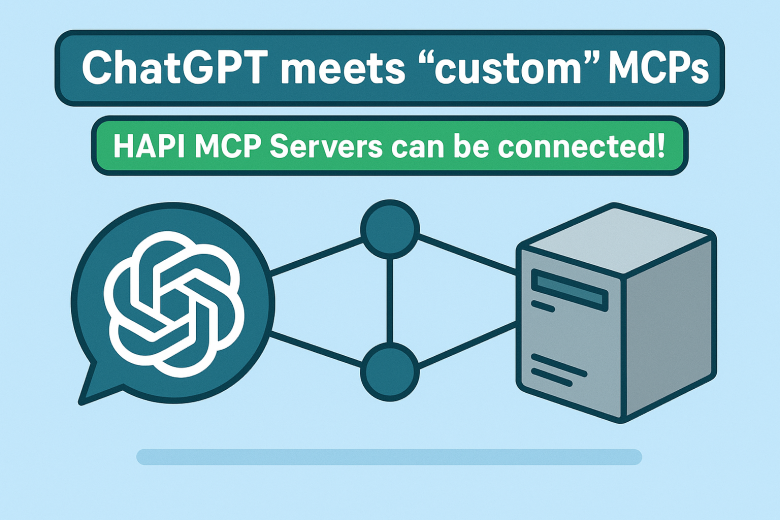
Imagine a world where ChatGPT doesn't just answer your questions—it talks directly to your systems. Your API. Your server. Your private data.
That world is here.
OpenAI's allowing to connect Model Context Protocol (MCP) has just crossed a huge milestone: ChatGPT can now connect with "custom" MCP Servers. And with HAPI MCP Servers, you can start building and connecting your own today in seconds.
But there's a caveat: right now, ChatGPT only works if your MCP Server implements two specific tools: search and fetch. Don't worry—I'll guide you through setting it up, explain what it means, and show you why this makes a significant difference.
What Is MCP, and Why Should You Care?
Let's break it down.
-
APIs today: Think of APIs as doors. If you have the right key (credentials, documentation, SDK), you can open them. But every door looks different. Some are REST, some GraphQL, some gRPC. Some are well-documented, others are a nightmare.
-
MCP's promise: MCP standardizes how AI models like ChatGPT talk to APIs. Instead of building one-off integrations, you build a server that follows the MCP spec. Once that's done, ChatGPT automatically knows how to talk to it. (or any other MCP-compatible client, i.e. Claude Desktop, QBot).
-
The business angle: This isn't just technical elegance—it's faster integrations, less developer overhead, and reduced cost of maintaining custom connectors. That means faster time to market and lower risk.
In short: MCP turns APIs into AI-ready services.
⚡ The Big News: ChatGPT Meets Custom MCPs
Until now, ChatGPT has only worked with a fixed set of tools. Think of them as pre-installed apps. Useful, but limiting.
Now? You can bring your own MCP Server into ChatGPT. That's like installing your own app in the App Store of AI.
With HAPI MCP Servers, the door is open:
-
You define your MCP logic (Swagger/OpenAPI, custom code, etc).
-
You expose it through the MCP standard (one command line to start).
-
ChatGPT connects and can be immediately used.
But there's a catch…
⚠️ The Caveat: search and fetch
Here's the current limitation (at least as of when this was written): ChatGPT will only talk to custom MCP Servers that expose two specific tools:
-
search– Let’s ChatGPT ask your server what resources are available.-
Think of it like browsing an API catalog.
-
Example: ChatGPT can "search" for available endpoints, functions, or datasets.
-
-
fetch– Let’s ChatGPT request a resource by name.-
Think of it like hitting "download" on the resource you found.
-
Example: ChatGPT can "fetch" a specific record, report, or file.
-
👉 Without these two, ChatGPT won't know how to interact with your MCP Server, and as of now, it won't work at all, even if your MCP server exposes other tools. You will get an error: “This MCP server doesn’t implement our specification. “
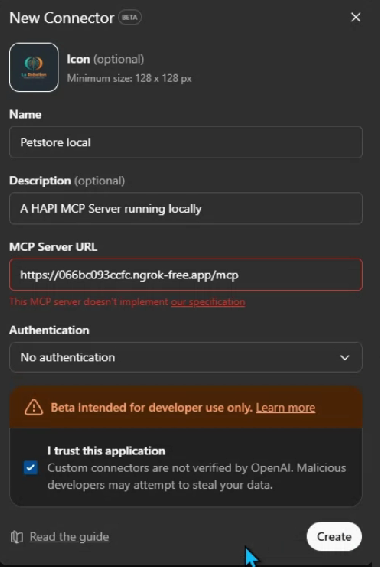
This is important. It means that if you're building your own MCP, you need to start with search and fetch as your baseline tools, at least for now, if you want ChatGPT to connect.
🛠️ Step 1: Build Your First MCP with HAPI
Here's where it gets exciting.
With HAPI MCP Servers, you don't have to reinvent the wheel. HAPI gives you a framework to:
-
Take your API logic.
-
Wrap it in MCP's protocol.
-
Expose it so ChatGPT can connect.
Think of HAPI as a Gateway for MCP Servers—a lightweight, flexible way to spin up a server that speaks MCP fluently.
🧩 Step 2: Point HAPI to your OpenAPI/Swagger (auto-generates search)
With HAPI MCP Servers, you don't implement search. HAPI reads your OpenAPI/Swagger spec and auto-builds the resource catalog, exposing a standards-compliant search tool automatically.
What to do:
-
Provide your OpenAPI/Swagger spec (file or URL).
-
Start HAPI MCP against that spec.
Example (pay attention to the --chatgpt flag):
# Local file
hapi serve petstore --headless --chatgpt

# Or remote spec
hapi serve --openapi https://petstore3.swagger.io/api/v3/openapi.json
Result:
-
searchis available immediately, listing operations/resources derived from your spec (endpoints, tags, summaries, etc.). -
No custom code required.
🧩 Step 3: Zero‑code fetch (auto-generated)
You also don't implement fetch. HAPI maps each searchable resource to a concrete retrieval operation using your OpenAPI details (paths, params, auth, and response schemas).
What you get:
-
fetchexecutes the proper request and returns JSON/text per the spec. -
Response shaping and content-type handling come out of the box.
Optional:
- You can override defaults (e.g., auth, headers, timeouts), but it's not required for ChatGPT connectivity.
🔌 Step 4: Connect It to ChatGPT
OpenAI's MCP docs show how to connect MCP Servers. Here's the gist:
-
Run your HAPI MCP Server locally or in the cloud.
-
If you run it locally, use a tool like ngrok to expose it publicly.
-
If you want to run it in the cloud, install it on any VM server or use runMCP.
-
-
Go to your ChatGPT settings → Connectors → Create.
-
Fire up ChatGPT and test!
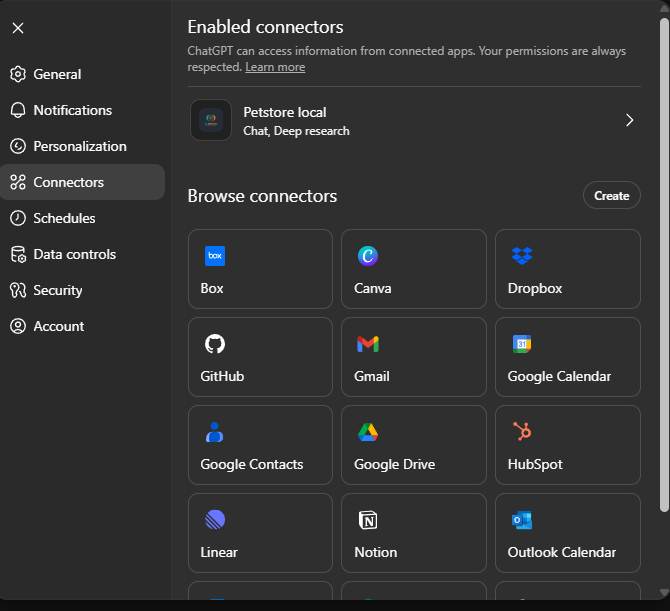
From that point on, ChatGPT treats your MCP like a first-class citizen. Ask it:
"What's in my Q1 Revenue Report?"
And instead of hallucinating, ChatGPT fetches real data from your MCP. Is RAG from your own systems!
Demo Time!
Here's a quick demo of how it works in practice:
🎯 Business Impact: Why This Matters
Let's translate the tech into business value.
-
For executives: This reduces integration costs and speeds up AI adoption.
-
For PMs: You can now think of MCPs as product features. Want ChatGPT to "understand your platform"? Wrap your API in MCP and ship it.
-
For engineers: It's one spec to learn. One server to implement. No more writing custom ChatGPT plugins.
-
For designers & end-users: It means faster, smoother, and more reliable AI-powered workflows. Less "Sorry, I don't know that" and more real answers from real systems.
📚 A Guided Path: From Zero to MCP
Here's how you can get started:
-
Read the MCP spec – OpenAI's MCP docs.
-
Use HAPI – the quickest way to spin up your MCP Server.
-
Start small – customize
searchandfetch. Test them with ChatGPT. -
Iterate – add more tools once the basics work.
And remember: these are early days. My expectations are high. The current limitation (only search + fetch) will expand. Soon, you'll be able to expose more advanced tools and workflows. 🤞🏽
What's Next?
Here's where I see this going:
-
Beyond
searchandfetch– Future versions of ChatGPT will support richer tools. Imaginecreate,update,delete, or even full workflow orchestration. -
Enterprise MCPs – Companies will wrap entire business systems in MCP to make them AI-ready.
-
Agent-to-Agent Communication – MCP makes it possible for different AI agents (not just ChatGPT) to talk to the same backend services consistently.
This isn't just a developer milestone—it's a paradigm shift for AI-powered business workflows.
✅ Final Thoughts
The integration of ChatGPT with custom MCP Servers is one of those rare shifts that unlocks a cascade of possibilities.
Today, it's simple: implement search and fetch. Tomorrow, it's expansive: AI systems deeply integrated with your data, tools, and workflows.
With HAPI MCP Servers, you don't just consume this future—you build it.
So, the question isn't "Should I try this?" It's: How fast can you wrap your API in MCP and let ChatGPT talk to it?
🔗 Resources