From Swagger to MCP
Why should you care about MCP (Model Context Protocol)? Because it's quickly becoming the bridge between APIs and AI. If APIs are the nervous system of modern software, MCP is the
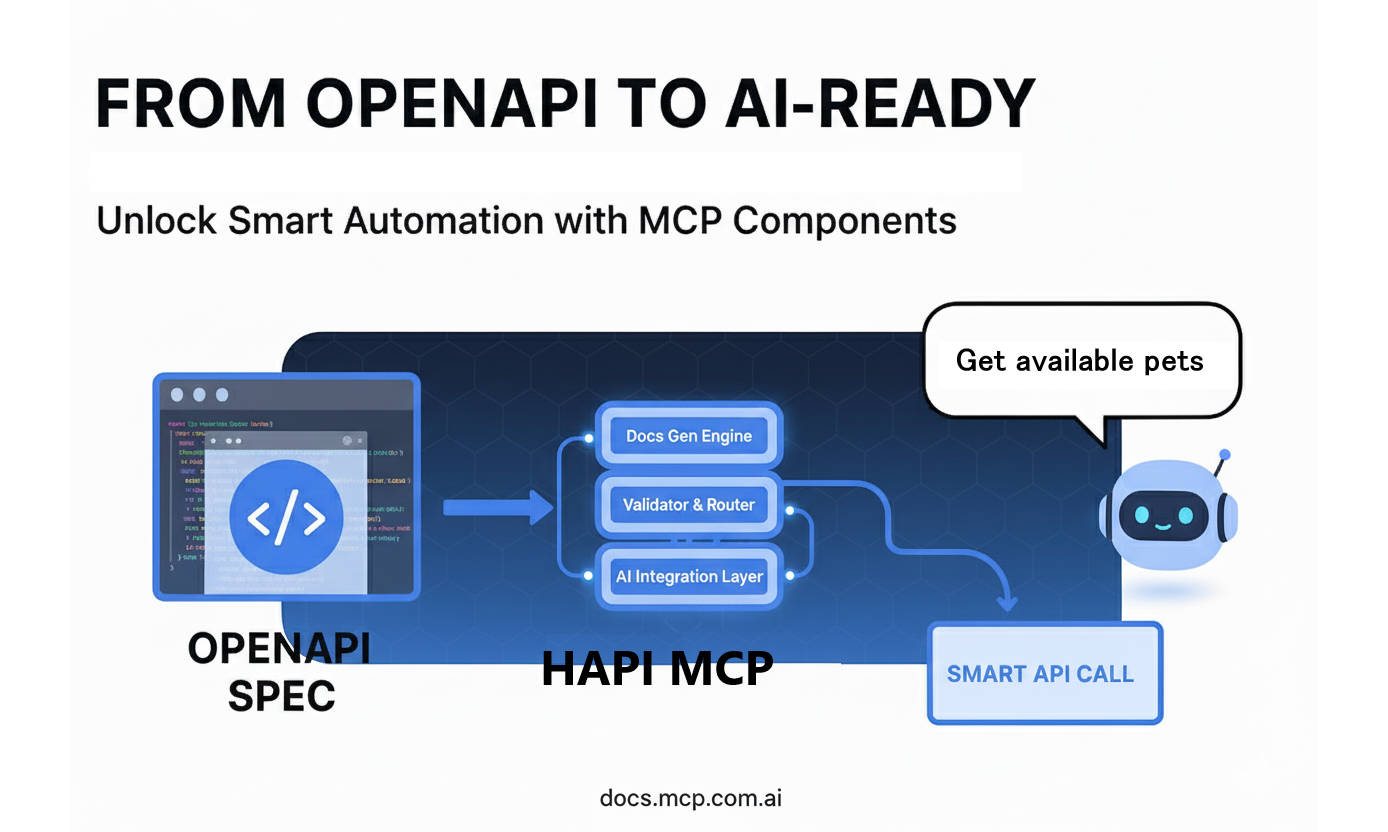
Why should you care about MCP (Model Context Protocol)? Because it's quickly becoming the bridge between APIs and AI. If APIs are the nervous system of modern software, MCP is the translator that makes them accessible to large language models (LLMs) and AI agents.
In this post, I'll show you how to take a Swagger (OpenAPI) specification and, with just one command, spin up an MCP server ready to power copilots, agents, and AI-native applications.
And here's the kicker: you won't write a single line of code.
👉 At the end, you'll also find the video walkthrough where I demo this live.
TL;DR
For those in a hurry, here's the TL;DR:
-
MCP standardizes how AI agents interact with APIs, eliminating the need for custom integrations.
-
You can convert OpenAPI specs into MCP servers effortlessly, and you can have an MCP server up and running in minutes, making your APIs AI-ready.
-
This approach saves time, reduces costs, and future-proofs your API strategy.
That's not all, from the date this post was written (September, 2025), many things are happening in the MCP ecosystem, AI time is moving fast:
Here's some great news! You can now explore MCP-related skills on Skills.sh, making it easier to work with MCP servers and APIs. For specific details, check out Agent skills.
If you're interested in building MCP servers using OpenAPI specs, be sure to visit hapi.mcp.com.ai. Plus, our community offers fantastic tools: convert OpenAPI to MCP with swagger-to-mcp skill and evaluate MCP servers with mcp-server-evaluations skill.
Business Impact First
When considering the adoption of MCP, it's essential to understand the tangible benefits it brings to both technical teams and business stakeholders.
For businesses, MCP eliminates the need for costly and time-consuming custom integrations. Standardizing how APIs interact with AI agents reduces the reliance on fragile, one-off connectors that often lead to maintenance headaches. This translates directly into cost savings and reduced operational risk.
From a time-to-market perspective, MCP accelerates the process of making APIs AI-ready. Instead of spending weeks or months building glue code, teams can leverage MCP to instantly expose their APIs to AI agents. This means businesses can respond faster to market demands and stay ahead of competitors.
Moreover, MCP positions organizations for the future. As AI agents become a standard part of digital ecosystems, having APIs that are already consumable by these agents ensures future-proofing. This strategic alignment not only supports innovation but also minimizes disruption as AI adoption grows.
For executives, MCP aligns with broader business strategies by enabling agility and reducing technical debt. For engineers, it simplifies workflows, allowing them to focus on delivering value rather than wrestling with integration challenges.
In short, MCP bridges the gap between technical efficiency and business impact, making it a win-win for all stakeholders.
🤔 What is MCP, Really?
MCP (Model Context Protocol) is like REST for AI agents.
-
It defines how agents (Copilot, LangChain, custom LLMs, etc.) can discover, connect to, and use APIs.
-
It standardizes interactions so we don't reinvent integration every time.
-
It's designed to be open, language-agnostic, and scalable.
If you think about it, APIs revolutionized cloud services by making them programmable. Similarly, MCP is transforming APIs into agent-consumable interfaces. To achieve this, API providers can leverage their existing OpenAPI specifications to seamlessly expose their APIs in a way that MCP clients can readily understand and utilize; that's why MCP and OpenAPI are a perfect match.

🛠️ The Technical Challenge
Traditionally, if you wanted your AI copilot to talk to your API, you had to:
-
Write custom wrappers.
-
Manually map endpoints to AI tools.
-
Deal with endless schema alignment issues.
This is fragile, time-consuming, and expensive.
Enter HAPI: Your Shortcut to MCP Servers
Imagine a tool that takes your Swagger/OpenAPI specification and, with minimal effort, transforms it into a fully functional MCP server. That's exactly what HAPI does.
HAPI is a framework designed to simplify the process of creating MCP servers. It eliminates the complexity of manual integration by instantly exposing your API as an MCP server. With HAPI, you can bridge the gap between your APIs and AI agents in just a few steps—no coding required.
Whether you're working with a simple API or a complex enterprise-grade system, HAPI ensures that your APIs are AI-ready, scalable, and easy to manage. It's the ultimate enabler for teams looking to unlock the potential of AI-driven applications without the usual headaches of custom development.
Get the latest version of HAPI from GitHub.
⚡ The Simplest Way to Create an MCP Server
Here's how I did it in the demo video (below):
1. Start with Swagger Spec
I used the famous PetStore Swagger example. This gives us a simple API with endpoints like:
-
GET /pet/{id}→ Get pet by ID -
GET /pet/findByStatus→ Find pets by status
No coding needed. Just the API spec.
2. Store the Spec Locally
Download the spec and save it locally. This gives us a blueprint of endpoints and operations.
3. Run HAPI
Now the magic:
hapi serve petstore --headless
That's it.
-
--headlesstells HAPI to consume services from the backend directly (the head). -
The MCP server is now running locally on port 3000.
4. Connect to VS Code
Open VS Code, add an MCP server configuration:
{
  "name": "Petstore MCP",
  "url": "http://localhost:3000/mcp"
}
Start the server, connect, and you'll see 19 tools exposed automatically.
🔍 Putting It to the Test
Once connected, you can:
-
Ask your AI copilot: "Get pets by status available."
-
The LLM resolves the correct MCP tool (
findPetsByStatus). -
The response comes back instantly, just like hitting the API.
Example:
[
  {
    "id": 10,
    "name": "doggie",
    "category": {
      "id": 1,
      "name": "Dogs"
    },
    "photoUrls": [
      "string"
    ],
    "tags": [
      {
        "id": 0,
        "name": "string"
      }
    ],
    "status": "available"
  }
]
And it works the same if you hit the API directly.
🎯 Why This Matters for AI Agents
With MCP:
-
AI copilots don't need custom wrappers anymore.
-
LLMs can auto-discover tools via your API spec.
-
You can control which endpoints are exposed to the agent (important for governance and security).
This transforms any API into an AI-first product.
🔒 Sneak Peek: Adding OAuth2
In the next step (and in the upcoming video), I'll show how you can inject OAuth2 authentication directly into the Swagger spec.
-
No extra code.
-
HAPI auto-detects the auth configuration.
-
You can integrate with providers like Authentik seamlessly.
This makes MCP servers not just easy but also enterprise-ready.
📺 Watch the Walkthrough
Here's the full demo where I set up the MCP server in real time:
FAQ
What is MCP (Model Context Protocol)?
MCP is a standard that lets AI agents discover and use tools exposed by APIs in a consistent, secure, and auditable way.
What is the fastest way to convert an OpenAPI (Swagger) spec into an MCP server?
Use HAPI. With a single command like hapi serve <project> --headless, you can generate an MCP server without writing custom code.
Do I need to write code to create an MCP server from Swagger/OpenAPI?
No. HAPI can turn an OpenAPI v3 spec into an MCP server with zero custom code. Skill available: swagger-to-mcp.
Does MCP work with OpenAPI v2 (Swagger 2.0)?
HAPI requires OpenAPI v3.x. If you have Swagger 2.0, convert it to OpenAPI v3 first.
Where is the MCP endpoint when using HAPI?
By default, MCP is available at http://localhost:3000/mcp (or the port you configure).
How do AI agents discover tools in MCP?
Agents call tools/list on the MCP server, which returns the tool catalog derived from your OpenAPI operations.
Can I control which API endpoints are exposed as tools?
Yes. You can limit exposure by curating your OpenAPI spec or providing a filtered spec for MCP generation.
Is MCP secure for enterprise use?
Yes, when deployed with proper auth (OAuth2, API keys, etc.) and policy enforcement at the boundary. MCP keeps authority outside the model.
Can I deploy MCP servers to the cloud?
Yes. HAPI supports deployments to Cloudflare Workers, Docker, Fly.io, and other environments.
How do I test if my MCP server works?
Check /health, call ping, list tools with tools/list, and run a sample tool call. You can also use the mcp-server-evaluations skill for a structured test.
What’s the difference between MCP and REST?
REST is an API style. MCP is a protocol for how AI agents discover and invoke tools, often backed by REST APIs.
How does MCP improve SEO/AEO for APIs?
It makes APIs machine-discoverable for AI agents, increasing tool discoverability and enabling answer engines to access structured actions.
✊ Go Rebels
At La Rebelion, we believe in tools that remove friction and let engineers (and businesses) focus on what matters: building value.
MCP is more than just another protocol. It's the bridge between your APIs and the AI-native future.
So, go ahead. Try it with your own Swagger spec. You'll see just how easy it is.
The future of API integration is agent-first. And it starts with MCP.
💡 Pro tip: Share this with your engineering team and product leaders. MCP will impact both sides of the business equation — execution and strategy.